
Scan a receipt
Add a receipt from camera, photos, or file when you choose.
Receipt-first budgeting · iOS & Android
Captain Frugal scans your receipts with AI, categorizes items inside each receipt, and turns them into a live budget. Keep it private, or share a household view with your partner.
How it works
Add a receipt from camera, photos, or file when you choose.
Confirm the extracted spend before it affects your records.
Your remaining budget updates around what you actually bought.
Keep it private, or share one household view with your partner.
Why Captain Frugal
The receipt-first views that keep the month current without the admin work.
Snap a receipt and AI fills in the merchant, date, and totals. You stay in control with a quick review.
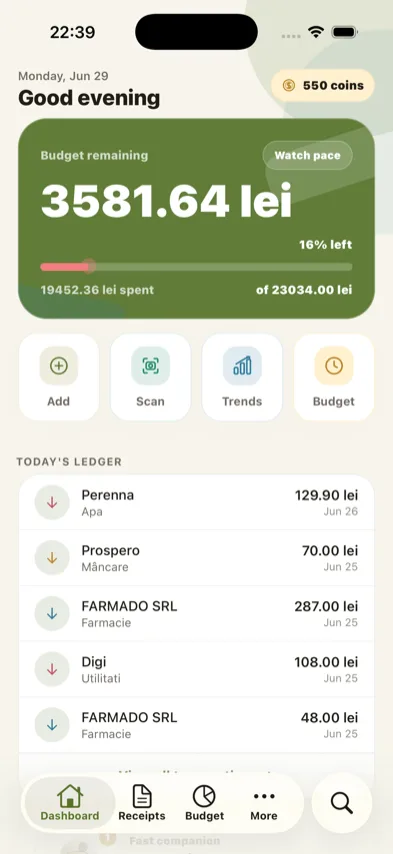
Remaining budget, spent amount, and forecast live together in one view — private for you, or shared with your household.
Planned expenses for rent, fuel, trips, and goals — before they surprise you.
Save a clear monthly report with cashflow, adjustments, and totals.
Leak checks combine receipts, planned expenses, and budget pace so spending drift shows up before the month is already gone.
Price Watch uses repeated receipt items to flag unusual price movement with the evidence still attached.
Why receipt-first
Receipts catch the details that decide whether a budget still works.
Receipt tracking keeps everyday spending visible even when it never touches a bank feed cleanly.
See where categories actually happen: groceries, dining, fuel, trips, returns, and reimbursements.
Combine confirmed receipts with planned expenses, so the month is not a mystery until it is over.
See the difference
Here’s an example month: the same income, the same habits — the only change is seeing every receipt the day it happens.
Found by catching small overspends in week one — not discovering them in week four.
Every scanned receipt updates your remaining budget the same day, so drift shows up while you can still act on it.
Illustrative example based on a sample budget — not a guarantee of savings. Your results depend on your spending and habits.
Rewards & smarter spending
Stay consistent, unlock rewards, and let your own receipts show you where the better deals are.
Your calm money guide for receipt reviews, progress nudges, and weekly recaps. He keeps the habit visible without making budgeting feel like punishment.
Daily reviews, receipt scans, and weekly recaps earn coins to spend on themes, badges, and premium previews.
Every streak, scan, and recap stacks up coins — spend them to unlock new themes, badges, and previews of premium features.
Categorize items inside a receipt, so every purchase lands in the right category.
Captain Coins are in-app rewards only — never cash, never purchasable, never transferable.
Trust first
Your budget is built from receipts you choose to add.
AI suggests, you confirm. Nothing changes your budget without you.
Keep your budget just for you, or invite your partner when you both want the same household view.
Your data, your call. See account deletion.
Captain Frugal helps organize your budget. It is not financial, tax, legal, investment, credit, or insurance advice.
Built for
Share the same view when both people need to know what is left.
Keep cash purchases and receipt-only spending from disappearing.
Track groceries, fuel, trips, returns, and reimbursements with proof nearby.
Keep the discipline of tracking without rebuilding a sheet every month.
FAQ
People who want receipt-aware budgeting with AI receipt scanning, item categories, planned expenses, leak detection, Price Watch, and monthly reports without maintaining a spreadsheet.
Yes. AI-assisted scanning reads the details from your receipt, and you review everything before it touches your budget.
No. Captain Frugal works from your receipts and plans — no bank link required.
Receipts can show cash spending, store-level habits, reimbursements, planned expenses, and everyday purchases that bank feeds often miss or group too broadly.
Receipt uploads power AI-assisted scanning, review, and your spending records. You can review and correct every extracted detail, and the privacy policy explains the data handled.
Yes, both. Use your Apple ID email for the iOS TestFlight beta or your Google Play email for Android.
You submit the request, confirm your email, and Captain Frugal reviews beta requests in batches. If a spot is available, you receive the next steps for your platform.
Yes. You can keep Captain Frugal private, or use household sharing when you and your partner want to plan from the same budget view.
Yes. Send feedback to support@captain-frugal.com. Helpful beta feedback may be eligible for prizes, such as limited-time premium access or other rewards, after the store listing.
Yes, the beta is free. Any future pricing or premium features will be shown in the app and the store listing.
No. Captain Frugal helps organize budget information and receipt records. It is not financial, tax, legal, investment, credit, or insurance advice.
Free iOS & Android beta
Pick your platform and confirm your email so the request can be reviewed for the private beta.